Make data-backed decisions faster with Legodesk’s smart reporting tools. Track recovery performance, borrower activity, and workflow efficiency in real time. Generate detailed compliance reports to ensure adherence to RBI and other regulatory guidelines.
Download & Create New Report
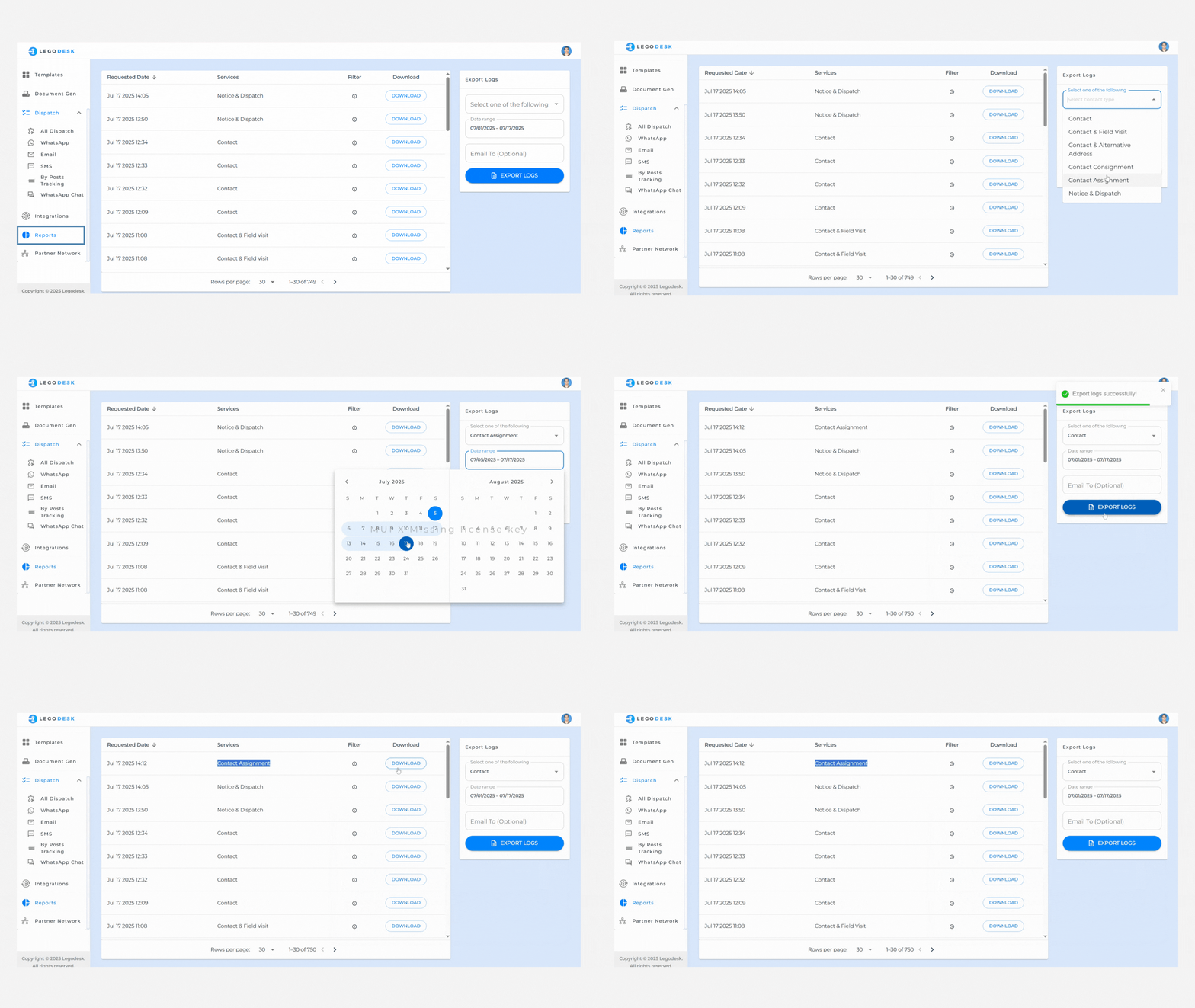
Navigate to Reports Go to the “Reports” Menu
Download Available Reports You can directly download any of the available reports listed.
Export Logs
Click on “Export Logs.”
From the dropdown, choose the type of report you wish to export.
Select the date range for which you need the report.
(Optional) Enter your email address if you want the report to be sent directly to your inbox.
Click “Export” to complete the process.
Legodesk is not a law firm and does not provide legal advice. The use of any materials or services or software is not a substitute for legal advice. Only a legal practitioner can provide legal advice and a legal practitioner should be consulted for any legal advice or matter. We neither endorse, nor solicit the work of any Lawyers, Law Firms, and Legal Professionals.